

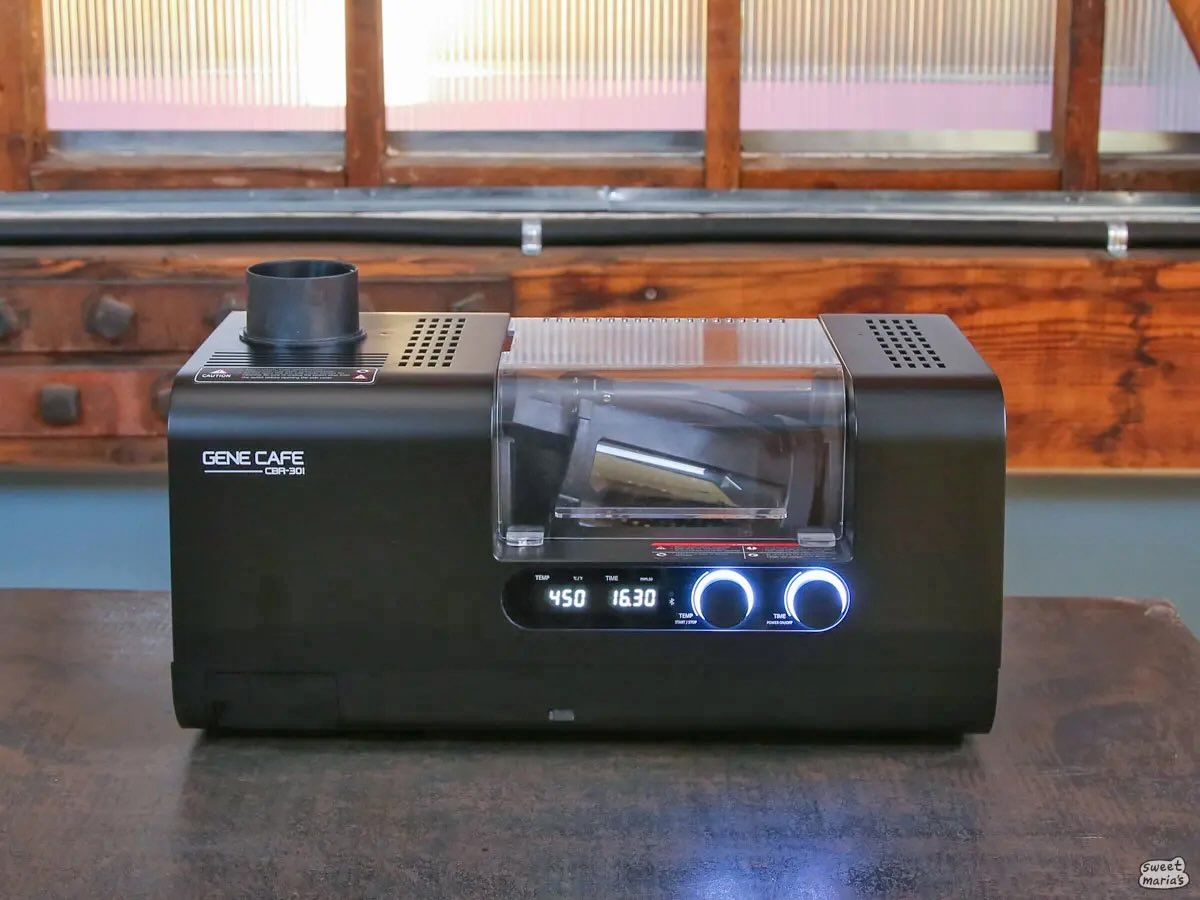
We recently added the Gene Cafe CBR-301 to our line of home coffee roasters. If you’re familiar with the CBR-101, then you’ll easily adapt to using the 301. However, you’ll also have an extended set of controls for drum settings and fan speed, as well as capabilities to record roast information (such as 1st CrackAn audible popping sound heard during roasting. In coffee, one refers to "first crack" and "second crack," which come from two different classes of chemical reactions.: An audible... ...more, 2nd Crack) with the Gene Cafe App.
We’ve been testing the 301 extensively behind the scenes, getting to know how the roaster differs from its other counterparts and noting any changes to our workflow with the addition of the app. Since we’ve gotten to know it fairly well, let us give you a tour of the app!
Shop the Gene Cafe line on Sweet Maria’s.
Download the Gene Cafe App on the App Store or Google Play Store.
Watch the video below or on YouTube.
19 Responses
I recently purchased one from you folks and LOVE it. It frequently increases the fan saying over heat protection – have you seen this?
Hey Greg, yes we have, but only a handful of times. We noticed it tends to happen when running fan on low as the roaster gets near first crack or occasionally mid-roast when the fan is on low and the roaster was aggressively pre-heated. It doesn’t seem like a big issue to us, mostly because our favorite roasts came from increasing fan speed approaching first crack and from mild (200 F for 5 minutes) or no pre-heating. We’re still experimenting and working on some articles, but in any case this safety mechanism didn’t seem like it significantly altered any roasts.
We’re getting it every batch. letting the roaster do what it wants so far. taking 4.5 min to clear. only roasting 150 grams per batch.
How exactly can you hear 1st and 2nd crack?
It is tricky, especially second crack. For both we literally use a paper towel tube as an ear trumpet by holding the end of the tube close to the exhaust when first crack is near. Barring that, we can usually (but not always) hear the cracks by just keeping our head close to the roasting chamber itself (but behind the safety cover of course). It’s equally important to watch for the visual cues like bean size expansion and noticeable increase in chaff shedding to give you an idea about where you’re at. Our experience has been that if you use all the clues it becomes easier to hear and identify the cracks and separate out their sound from other ambient noise.
Curious, when we find a profile we like, how do we load it into the machine?
Hey Crispin, the roaster doesn’t have that functionality. The app gives you more access to manual controls over the physical controls (drum speed and fan speed) and data logging. It doesn’t have any automated roasting or profile following features.
So in theory, with the app and being able to monitor what my my roast is doing, it should be easier to have more consistent roasts with this unit than with my FR-800?
Perhaps, but not necessarily. The app basically logs the roast for you and allows you to make changes to fan speed, end temp, end time and drum speed, but you still have to do all the manual work (weighing the coffee, adjusting for conditions, setting the time and temp, making adjustments at the right time, etc) to achieve consistency. Funnily enough, you can’t see the roasting screen and roast logs at the same time in the app, so you need to note the adjustments and their timing outside the app (paper, word doc, etc) if you’re trying to replicate a roast exactly.
You can achieve the same thing with paper note-taking on the SR800 by noting the time when adjustments are made and tracking the temperature readout at set time intervals. The Gene Cafe requires fewer adjustments than the SR800, which requires regular adjustments to fan speed and power to achieve a roast, but is also less flexible and rewarding in terms of making changes or experimenting with different roast approaches.
I just finished my 14th roast and am getting frustrated by the inconsistency of the GC 301 and its inability to replicate a roast even with the same beans from the same bag. Mostly, and maybe this is a problem with my machine, is the thermal limit fan kicks in and flattens the roast curve, effectively stalling the ROR, preventing me from implementing my desired profile and getting a good roast. When this happens you lose control of the machine and your roast. This is happening from both a cold machine start and subsequent runs. I’m only running 225g batches of beans and my temperature set points have never been above 490F. Usually 480F-485F is my max setting. Very predictively at between 5:30 to 6:30 into the roast at around 470F the thermal limit warning kicks in and the fan speed automatically goes to 3 and significantly reduces the ROR. This normally lasts 3 to 4 minutes. So, either there is something wrong with the machine in need of repair (hardware) or a software/firmware issue in need of fixing. The 301 in this state is just not a very usable machine for allowing you to run a standard progressive roast profile. With the fan stalling the ROR, my roasts to get to a medium-dark is taking between 13 and 13.5 minutes with the profile ratios way off from a standard 50/30/20. I really want to like this roaster, but something is wrong here, making this roaster difficult to use. I’m very frustrated. Does anyone know what is going on here or have advice on how to deal with this issue.
Based on your comment we ran some tests in the warehouse on our machine. From a cold machine, it took us 10:30 to hit the thermal safety with 225g beans at Fan 1 Drum 3 the entire time. We hit the thermal safety at 465 degrees F. After running the roaster through a full cooling cycle, we immediately ran another batch. Same coffee, 225g at Fan 1 Drum 3 the entire time. We hit the thermal safety at 8:11 and 460 degrees F. In both instances the overheat cleared in about 2 minutes and the roast impact (to our tastes, totally understand if you feel differently) was negligible. Our typical roast approach (which relies on progressive increases in fan temperature) doesn’t run into this limitation. We find we have to run the machine at Fan 1 the whole time to trip the thermal safety.
It definitely seems like the machine is behaving as designed. We don’t have any insight, but this seems like a safety feature to protect some component. If we had to guess it’s the heating element itself, which possibly relies on the air passing over it (and dispersing heat from the element into the roast chamber) to not overheat.
Its surprising you were able to get to 470F so quickly. We do not pre-heat generally, and if we do it’s for around 5 minutes at 250 to 300 degrees F. Even doing that we’ve never gotten close to 470 in such a short amount of time. So if you’re hitting that from a cold roaster, you might check to make sure your chaff collector is clean/clear and that there’s nothing impeding the airflow out the exhaust end of your roaster.
Sorry you’re having a frustrating go of it so far. Happy to share any insights or answer and questions we can!
Jarrett. Thanks so much for this great feedback and testing. Interesting that you hit the thermal limit at approximately the same temperature I have (`470) but a different time. I generally use the default Level 2 for both fan and drum, but have dropped fan to 1 which trips the thermal limit even earlier. First, my numbers are with a decaf Columbian SWP, which I know roasts very differently than even the same bean that has not gone through the decaf process. Not sure what type of beans you used and their density, moisture content and porosity versus the decaf I was using. That could be a major factor. I have run cold (no prior roasts), roasts after a cooling cycle, and with and without preheat. At least with the 101 machine, which are most of the available profiles out there, people are almost universally doing some level of preheat, so I have mostly done preheating to what others are doing in the 465 to 480 range. The machine is completely cleaned of all chaff after each roast, and as you know, decaf produces very little chaff. I roast outside, so not using a vent hose. Ambient temperature is usually 70F +/- 3 degrees and humidity usually between 60% and 70% (San Diego). I would next like to run roasts to match your exact settings using the same beans and see what happens. This would be a good benchmark. Let me know the beans you used and I’ll buy some from your website. And we could each also roast one of your decafs to the same settings. Matching coffee and roasting profile would let us know if our 301 machines are behaving differently. I am usually roasting for espresso to Full City and Full City+. Not sure what you roasted to. I generally run the roast at the default Level 2 for both fan and motor. Thanks again.
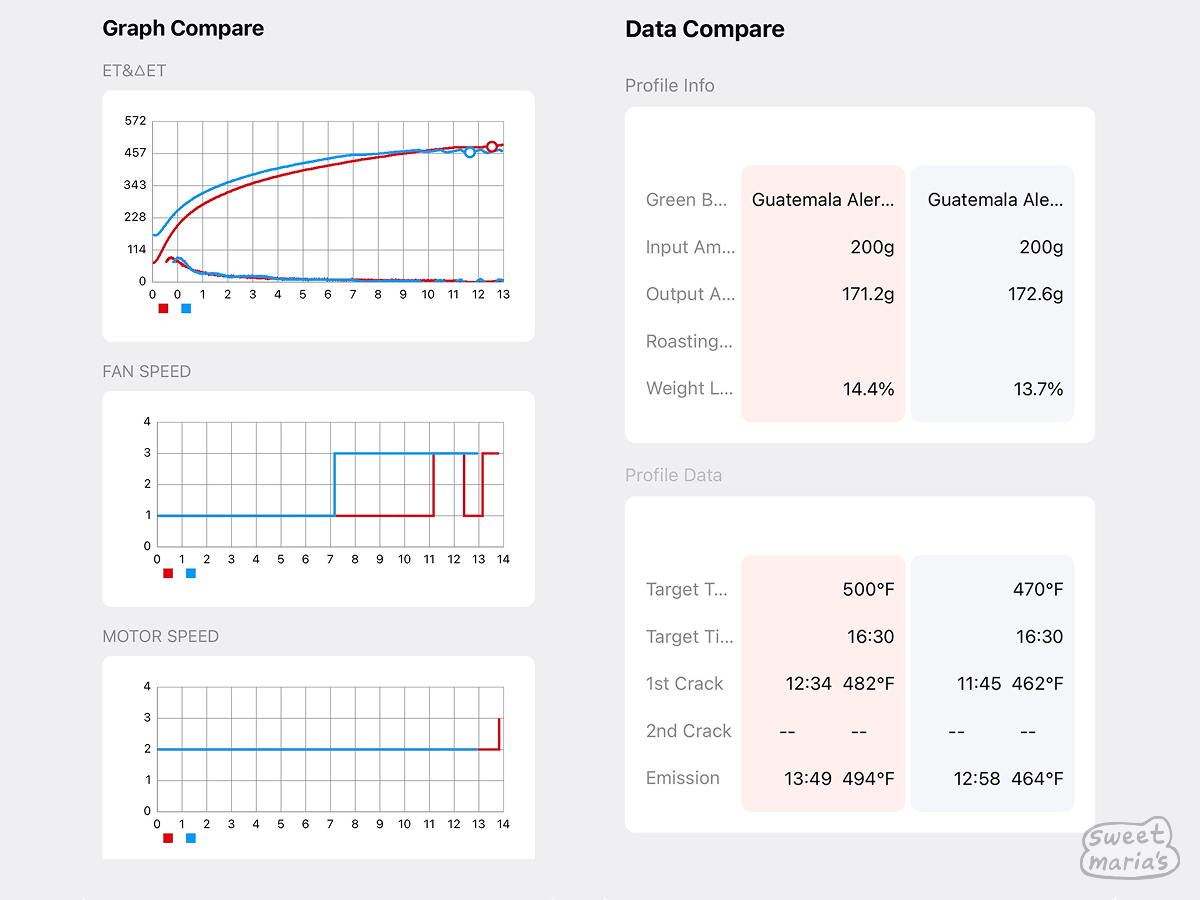
Jarrett. I just spotted the two roast logs up at the top of this thread and see where the overheat fan kicked in at about 7 minutes and ~460˚ on one roast (blue). Couldn’t tell if the second roast (red) was a manual fan input as it went up, down and up again in a short period. And per the other commenters, they are having the same overheating issue. We should not be getting overheating warnings with fan interventions taking over the roast. Something has to be wrong here that hopefully Gene Cafe can correct. Thanks again for your help and hopefully you have a direct connection to Gene Cafe. You guys pull far more weight with them than we do.
Hey David, we used our new Espresso Workshop #51: Silvertone Blend. 225g, totally cold roaster (no pre-heat at all) with 2:30 of development time after first crack. Both roasts came out a nice Full City at 14.6% and 14.8%. Should also mention that the 301 manual specifically warns against pre-heating. We are not doing it at all in practice, though obviously the roaster was a little warmed up on the second roast.
On the roast graphs you see those were all manual inputs, they were not fan overrides. Yes, even the one that jumps around. That was a “learning” roast. Still tasted good! In normal operation we don’t experience the safety override of the fan. We really have to go out of our way to do things we know will trigger it, like aggressive pre-heating or keeping the fan at 1 throughout the roast.
Won’t have a chance to test any decafs, but perhaps somebody else will see this and they can weigh in.
Jarrett. Just bought 2 pounds of the Espresso Workshop #51 to do some test benchmark roasting and share my results with you. I’ll also share some of my decaf roast results with you for reference. Please send me all the settings you used and I will match with my roasts of the #51. You can email them directly to me if convenient.
Hey David, if you’re intentionally trying to set off the override, you can just follow what I detailed in the other comments. If I were just roasting this coffee normally, for a full city roast I would do 225g, no preheat, Drum 3, Fan 1, Set Temp: 475. I would keep Fan 1 until 375F, then Fan 3 until the end of roast. Listen for first crack around 11:30 – 12 minutes. Once rolling first crack (several cracks in succession) is achieved I would dial the temp back to 462 for the remainder of the roast. 2:30 development time from FC to roast end. Cool externally.
Got it. Will roast as soon as the beans are delivered. Thanks.
I just purchased the 301 and roasted a few batches (225g), but I got uneven roasted beans (was trying to get medium dark). What is your suggestion about “preheat” and “drying” steps? I didn’t preheat but I did set up 5min drying at 300F before cranking up to 473F. Thanks!
Hey Michael, just going to copy our basic Gene Cafe approach from another thread that should answer your question:
We would recommend a batch size of 200g. Once you get some roasts under your belt you can make some changes to accommodate for larger or smaller batches, but 200g is the starting point we recommend. We don’t always pre-heat, but if we do it’s to 300F for 5 minutes. (Set temp to 300 and timer to 5:00). In our experience, pre-heating can sharpen the perceived acidity and “brightness” in cup, but in side-by-side blind tasting our staff have slightly preferred coffees roasted without pre-heating.
Once the pre-heat is done, we set the target temp to 476 and just let the roaster do its thing. No need to set intermediate temperatures. To start, we’d just leave it on Drum 2 and Fan 2. Typically we get first crack when the temperature is around 468 – 470F, around 11:30 – 12:15. Once first crack is just starting to roll (a few snaps in rapid succession) we like to drop the temp down so the roast doesn’t run away from us. We will usually drop it back to 470 or 468 depending on how rapidly first crack is progressing. For a city+ roast, 1:30 to 1:45 of development time produces consistent results. For full city to full city+, 45 – 60 more seconds should be getting you there, but you’ll need to judge the desired roast level yourself.
Once the cooling cycle is engaged, we use the E-Stop function to stop the drum and dump the coffee into an external cooler or colander, whatever you have. Make sure you have an oven mitt ready! Then we reinsert the drum and run a full cooling cycle to let the roaster cool down.
We’ve experimented with lower set temps, but for getting to first crack in a reliable time 466F seemed to be the lower limit. The coffee would hit first crack but it took awhile, so going with a higher set temp then dialing back at first crack seems to work best for us. Most of the challenge with the Gene Cafe is in managing the roast and temperatures from first crack and beyond.
Hopefully that gives you a good starting place, but the Gene Cafe just like any other roaster has a learning curve.